<region>
O elemento <region> define os valores iniciais para a esquerda, direita, Propriedades superior, inferior, altura, largura e zIndex de um elemento <media> que indiretamente se refere a ele usando um elemento <descriptor>.
A posição de uma região, conforme especificado por seu top, bottom, Os atributos left e right são sempre relativos ao pai geometria, que é definida pelo elemento pai <region> ou pelo total área do dispositivo no caso de regiões de primeiro nível de aninhamento.
Os atributos top e left são a região primária atributos de posicionamento. Eles colocam o canto superior esquerdo da região no distância especificada da borda superior esquerda da região pai (ou do borda superior esquerda do dispositivo no caso da região mais externa). Às vezes, definir explicitamente os atributos bottom e right é útil. Seus valores indicam a distância entre o canto inferior direito da região canto e o canto inferior direito da região pai (ou o dispositivo borda inferior direita no caso da região ultraperiférica).
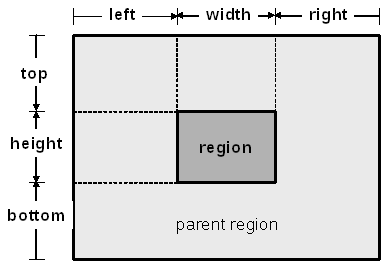
As regiões filhas não podem ficar fora da área estabelecida pelos seus pais regiões.
O atributo zIndex especifica a precedência da superposição da região, onde regiões com valores maiores de zIndex são empilhadas em cima de regiões com valores menores de zIndex.
Sintaxe
| Elemento | Atributos | Conteúdo | Pai |
|---|---|---|---|
| <region> | id, título, esquerda, direita, superior, inferior, altura, largura, zIndex | (<region>)* | <regionBase> ou <region> |
Atributos
| Nome | Valor | Descrição |
|---|---|---|
| id | Pode receber qualquer valor de string que comece com uma letra ou um sublinhado e que contenha apenas letras, dígitos, <"."> e <"_">. | O atributo id identifica exclusivamente o elemento dentro de um documento. |
| title | String. | O atributo title contém informações consultivas. Os valores do atributo title podem ser renderizados pelos agentes de usuário de várias maneiras. |
| left | Um número real no intervalo [0,100] terminando com o caractere <"%"> (por exemplo, "30%"), ou um inteiro positivo especificando o valor do atributo em pixels. Para valores em pixels, o qualificador de unidade "px" pode ser omitido. O valor padrão é "0%", se o valor do atributo não puder ser calculado a partir dos atributos width e right. |
Posição esquerda do conteúdo relativa à sua região pai (ou ao dispositivo no caso da região mais externa), expressa como uma porcentagem da dimensão width da região pai (ou da largura do dispositivo no caso da região mais externa), ou como um valor absoluto. Posiciona o lado esquerdo da região na distância especificada a partir da borda esquerda da região pai (ou da borda esquerda do dispositivo no caso da região mais externa). |
| right | Um número real no intervalo [0,100] terminando com o caractere <"%"> (por exemplo, "30%"), ou um inteiro positivo especificando o valor do atributo em pixels. Para valores em pixels, o qualificador de unidade "px" pode ser omitido. O valor padrão é "0%", se o valor do atributo não puder ser calculado a partir dos atributos width e left. |
Posição direita do conteúdo relativa à sua região pai (ou ao dispositivo no caso da região mais externa), expressa como uma porcentagem da dimensão width da região pai (ou da largura do dispositivo no caso da região mais externa), ou como um valor absoluto. Posiciona o lado direito da região na distância especificada a partir da borda direita da região pai (ou da borda direita do dispositivo no caso da região mais externa). |
| top | Um número real no intervalo [0,100] terminando com o caractere <"%"> (por exemplo, "30%"), ou um inteiro positivo especificando o valor do atributo em pixels. Para valores em pixels, o qualificador de unidade "px" pode ser omitido. O valor padrão é "0%", se o valor do atributo não puder ser calculado a partir dos atributos height e bottom. |
Posição superior do conteúdo relativa à sua região pai (ou ao dispositivo no caso da região mais externa), expressa como uma porcentagem da dimensão height da região pai (ou da altura do dispositivo no caso da região mais externa), ou como um valor absoluto. Posiciona o topo da região na distância especificada a partir da borda superior da região pai (ou da borda superior do dispositivo no caso da região mais externa). |
| bottom | Um número real no intervalo [0,100] terminando com o caractere <"%"> (por exemplo, "30%"), ou um inteiro positivo especificando o valor do atributo em pixels. Para valores em pixels, o qualificador de unidade "px" pode ser omitido. O valor padrão é "0%", se o valor do atributo não puder ser calculado a partir dos atributos height e top. |
Posição inferior do conteúdo relativa à sua região pai (ou ao dispositivo no caso da região mais externa), expressa como uma porcentagem da dimensão height da região pai (ou da altura do dispositivo no caso da região mais externa), ou como um valor absoluto. Posiciona a base da região na distância especificada a partir da borda inferior da região pai (ou da borda inferior do dispositivo no caso da região mais externa). |
| height | Um número real no intervalo [0,100] terminando com o caractere <"%"> (por exemplo, "30%"), ou um inteiro positivo especificando o valor do atributo em pixels. Para valores em pixels, o qualificador de unidade "px" pode ser omitido. O valor padrão é "100%" da dimensão height da região pai (ou da altura do dispositivo no caso da região mais externa). |
Altura do conteúdo a ser exibido, expressa como uma porcentagem da dimensão height da região pai (ou da altura do dispositivo no caso da região mais externa), ou como um valor absoluto. |
| width | Um número real no intervalo [0,100] terminando com o caractere <"%"> (por exemplo, "30%"), ou um inteiro positivo especificando o valor do atributo em pixels. Para valores em pixels, o qualificador de unidade "px" pode ser omitido. O valor padrão é "100%" da dimensão width da região pai (ou da largura do dispositivo no caso da região mais externa). |
Largura do conteúdo a ser exibido, expressa como uma porcentagem da dimensão width da região pai (ou da largura do dispositivo no caso da região mais externa), ou como um valor absoluto. |
| zIndex | Um número inteiro no intervalo [0,255]. O valor padrão é 0. |
O atributo zIndex especifica a precedência de superposição, onde objetos com maiores valores de zIndex são empilhados sobre objetos com menores valores de zIndex. |